Search Site

Feed Section

Thursday, August 4, 2011


Best Linux Software Applications for Guitarists and Guitar Enthusiasts

Posted: 04 Aug 2011 03:21 AM PDT

Whether you're casually strumming the chords to your first song, or enthralling a head-bobbing crowd with your 20-minute solos, there are a few applications that a guitar lover like you must have on your Linux box. Even though there are countless guitar apps for Windows and Mac, it doesn't mean that musicians on Linux should be left behind. Remember that the Linux platform has given birth to some of the most prolific songwriters of the century like Maestro Richard Stallman. His masterpiece, the Free Software Song, is still crooned by millions of Linux geeks, getting them through those atrocious weeklong coding marathons. So, there's no doubt that Linux does have some excellent applications that every guitar player would love to have on his or her computer.

Without much ado, here's the crème de la crème of Linux software applications for guitarists and guitar enthusiasts:


Guitar Pro
Even if you are a rookie guitar player, you must surely have heard of Guitar Pro, the popular guitar tablature editor and player. The proprietary multitrack editor is very useful for editing guitar (bass and six-string) tablatures as well as creating full-fledged musical scores. Since its inception, Guitar Pro has gained a lot of popularity amongst guitar enthusiasts, with the 'gp' files being made available on sites like Ultimate Guitar.

Initially, Guitar Pro was a Windows-only app, but thanks to the growing demand, it now runs across a variety of platforms including Mac (Intel only), iPhone, iPad and of course, Ubuntu. Currently, the Linux version of the software only works on Ubuntu as downloads are available as .deb file. The full version of the application costs about $60 and if you want to upgrade from an earlier version of Guitar Pro, be ready to shell out 30 bucks. If you want to try out a demo version of the application, head over HERE.


TuxGuitar
If you're enamored by the aforementioned Guitar Pro app but are wary about trying something that's not free or Open Source, then TuxGuitar is just the right tool for you. TuxGuitar, like GuitarPro, is a multitrack guitar tablature editor and player. It comes with great features like tablature editor, score viewer, multitrack editor, tempo management and much more. The best feature, however, is its ability to open Guitar Pro files.

As of now, TuxGuitar can import and export GP3, GP4 and GP5 files. The number suffixed to the extensions corresponds to version number of the software; that is, gp3 files are for Guitar Pro 3 and so on. The latest version of Guitar Pro is Guitar Pro 6 thus, TuxGuitar, to a great extent, serves as a nice alternative to Guitar Pro.

Here's a quote from one of the reviewers on the Ubuntu Software Center:

"Closest Open Source replacement for GuitarPro. It can play .gp4, .gp5 files. It's great and has no fallbacks. I use it all the time!"

TuxGuitar is free and open source so grab it and pass it on to your whole band.


Apt Link: http://apt.ubuntu.com/p/tuxguitar


GtkGuitune
gtkGuitune is a guitar tuning application that uses the method of Schmitt triggering to help you make sure that your guitar is always in tune. This method ensures that tuning is fast and accurate by harnessing the sheer power of your CPU. The application is free and open source and works well on Ubuntu. If you are using KDE, you might want to try Kguitune, which is a KDE version of the same application.


Apt link http://apt.ubuntu.com/p/gtkguitune


Audacity
Now that you've tuned your guitar, composed the score, it's finally time to record that masterpiece of yours. Don't worry though, Audacity, an amazing cross platform sound recording application is here to help you with it. We've already covered Audacity in an earlier post so I'm pretty sure you must be aware of it. The Open Source application is popular not only on Linux but also on Windows and Mac platforms.


Songwrite
Songwrite is a guitar tablature (fingering notation) editor and player, that is specially designed for Linux musicians. Songwrite can edit staffs and tablatures not only for guitar, but also for a variety of musical instruments like banjo, flute, and ukulele. Formerly known as Gtablature, this application allows you to print your compositions as well as play them with the help of external applications. Like many applications for this platform, Songwrite is free and open source, so go ahead and download it.


Apt Link: http://apt.ubuntu.com/p/songwrite

[HowtoForge] Newsletter 08/04/2011

HowtoForge Newsletter 08/04/2011
================================

*** Version 1.2 of the ISPConfig 3 Manual ***
=============================================

The next update of the ISPConfig 3 Manual is available in PDF format (version 1.2 for ISPConfig >= 3.0.3.3; Date: 05/04/2011).

Version 1.2 for ISPConfig >= 3.0.3.3 (Date: 05/04/2011)
Author: Falko Timme
308 pages

The manual can be downloaded from these two links:

http://www.ispconfig.org/ispconfig-3/ispconfig-3-manual/
http://www.howtoforge.com/download-the-ispconfig-3-manual


*********************************************
*********************************************


ISPConfig Monitor App for Android Phones
========================================

With the ISPConfig Monitor App, you can check your server status and find out if all services are running as expected. You can check TCP and UDP ports and ping your servers. In addition to that you can use this app to request details from servers that have ISPConfig installed; these details include everything you know from the Monitor module in the ISPConfig Control Panel (e.g. services, mail and system logs, mail queue, CPU and memory info, disk usage, quota, OS details, RKHunter log, etc.).

Download/Usage
==============

For download and usage instructions, please visit http://www.ispconfig.org/ispconfig-3/ispconfig-monitor-app-for-android/ .


*********************************************
********************************************


*** HowtoForge Now Has Its own Facebook Page ***
================================================

We at HowtoForge are proud to announce that our new Facebook page is now available under http://www.facebook.com/howtoforge. As most of you probably have a Facebook account, we want to use this additional channel to post updates and get feedback from you. Therefore we would like you to "Like" our page, share it with your friends, post comments, etc. :-)

http://www.facebook.com/howtoforge
********************************************************************


New HOWTOs:
===========

* Enabling Compiz Fusion On Linux Mint 11
* Installing And Using OpenVZ On CentOS 6.0
* Installing Subversion And Configuring Access Through Different Protocols On Debian Squeeze
* Monitoring ESX/ESXi Servers
* Install Camfrog Server Advanced 6.0 Linux On Ubuntu 10.10 (Maverick Meerkat)
* Installing rsnapshot On CentOS

++++++++++++++++++++++++++++++++++++++++++++++++++++++++++++

Enabling Compiz Fusion On Linux Mint 11
=======================================

This tutorial shows how you can enable Compiz Fusion on a Linux Mint 11 desktop (the system must have a 3D-capable graphics card - I'm using an NVIDIA GeForce 8200 here). With Compiz Fusion you can use beautiful 3D effects like wobbly windows or a desktop cube on your desktop.

You can find the document here:
-------------------------------
http://www.howtoforge.com/enabling-compiz-fusion-on-linux-mint-11


Installing And Using OpenVZ On CentOS 6.0
=========================================

In this HowTo I will describe how to prepare a CentOS 6.0 server for OpenVZ. With OpenVZ you can create multiple Virtual Private Servers (VPS) on the same hardware, similar to Xen and the Linux Vserver project. OpenVZ is the open-source branch of Virtuozzo, a commercial virtualization solution used by many providers that offer virtual servers. The OpenVZ kernel patch is licensed under the GPL license, and the user-level tools are under the QPL license.

You can find the document here:
-------------------------------
http://www.howtoforge.com/installing-and-using-openvz-on-centos-6.0


Installing Subversion And Configuring Access Through Different Protocols On Debian Squeeze
==========================================================================================

Subversion (svn) is an open-source version control system (VCS), used in the development of many software projects. This tutorial shows how to install Subversion on Debian Squeeze and how to configure it to allow access to a repository through different protocols: file://, http://, https://, svn://, and svn+ssh://.

You can find the document here:
-------------------------------
http://www.howtoforge.com/installing-subversion-and-configuring-access-through-different-protocols-on-debian-squeeze


Monitoring ESX/ESXi Servers
===========================

The purpose is to highlight the most important topics related to setting up ESX/ESXi monitoring as well as applications hosted within managed virtual machines (a MySQL database is used in this tutorial).

You can find the document here:
-------------------------------
http://www.howtoforge.com/monitoring-esx-esxi-servers


Install Camfrog Server Advanced 6.0 Linux On Ubuntu 10.10 (Maverick Meerkat)
============================================================================

This is an updated tutorial on how to install Camfrog Server on Ubuntu 10.10 (Maverick Meerkat). When I first saw that Camfrog Server was released I was excited until I realized it was only for RedHat AS/ES 4.x 5.x, CentOS 4.x 5.x, Fedora 6.x 7.x 8.x operating systems. Then I realized you can convert rpm packages to deb packages using alien; you can even have alien install the rpm automatically after converting it.

You can find the document here:
-------------------------------
http://www.howtoforge.com/install-camfrog-server-advanced-6.0-linux-on-ubuntu-10.10-maverick-meerkat


Installing rsnapshot On CentOS
==============================

Working for an IT Support company I needed a solution for automatically backing up a bunch of Linux servers, this guide will walk you through setting up rsnapshot on CentOS for automated rsync & ssh binary diff backups.

You can find the document here:
-------------------------------
http://www.howtoforge.com/installing-rsnapshot-on-centos


++++++++++++++++++++++++++++++++++++++++++++++++++++++++++++++
++++++++++++++++++++++++++++++++++++++++++++++++++++++++++++++

You can now support HowtoForge by becoming a subscriber:

HowtoForge Subscription
=======================

*** New! We now accept RBS WorldPay payments in addition to PayPal. ***

For a monthly fee of 5 EUR or 25 EUR for half a year, you can become a HowtoForge supporter and help us cover our costs (servers, bandwidth, etc.) and support ISPConfig development. In return, you receive the following benefits:

1. Download the ISPConfig 3 Manual (from http://www.howtoforge.com/download-the-ispconfig-3-manual).
2. Access the whole HowtoForge web site without any ads.
3. Download the results of our tutorials as VMware images (where available) (a list of downloadable VMware images is available here: http://www.howtoforge.com/list-of-downloadable-vmware-images).
4. Download our tutorials as PDF files.
5. View our tutorials as printer-friendly pages.
6. You will be marked as a "HowtoForge Supporter" in your forum posts.
7. Plus, you support the ISPConfig development.

If you have the free VMware Server or Player installed, you can import our VMware images and start playing around with the results of our tutorials immediately. It's a great way to track down problems with your own setup or simply to save time. ;-)

More details can be found on http://www.howtoforge.com/subscription.

++++++++++++++++++++++++++++++++++++++++++++++++++++++++++++++
++++++++++++++++++++++++++++++++++++++++++++++++++++++++++++++

Best Regards,

Your HowtoForge Team
Email: info@howtoforge.com
URL: http://www.howtoforge.com

To unsubscribe or update your records, click here: http://newsletter.howtoforge.com/howtoforge/user/update.php?email=matrixunix.ubuntu@blogger.com&code=d8531959c7da2982ec3a7f8f82a13961

Wednesday, August 3, 2011


8 of the Best Android Apps for Geeks

Posted: 03 Aug 2011 12:01 AM PDT

So, you're slightly on the geekier side of life? And, you're an Android user? Well, thanks to the relative openness of the popular mobile platform, you won't be missing out on all the geeky fun you have on Linux. Unlike the Apple app store, the Android Market is laden with apps that folks from every walk of life can relish.

Here are some Android apps that our geeky friends would love to tinker with, without bricking their phones… Well, hopefully.


ConnectBot
ConnectBot is an open-source SSH client for your Android mobile. With this nifty little app, you can connect to any SSH server located on this planet (and beyond). Features include simultaneous SSH connections, tunneling, and copy/pasting between different applications. There are plenty of other SSH apps, but according to user ratings, this is by far, the best one out there. It has a 5 star rating from about 21,397 users, so go ahead and start connecting.


App Link: https://market.android.com/details?id=org.connectbot


Hacker's Keyboard
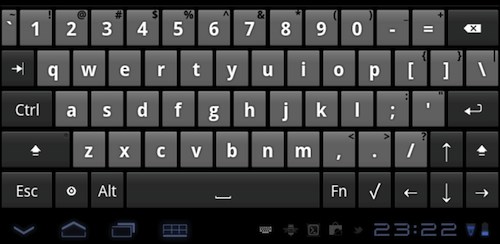
A good hacker loves his or her keyboard more than anything else. It's their only weapon, which brings them a notch closer to their goal of world domination. Whether you've just started or have already conquered half of Antarctica, this little app will allow you to use a full-fledged keyboard on your Android tablet or phone. Apart from being a good replacement to the default Android keyboard, Hacker's Keyboard acts as a perfect companion to the aforementioned ConnectBot app. So, you no longer have to worry about mistyping those life-changing commands you tap in the wee hours of the morning.


App Link: https://market.android.com/details?id=org.pocketworkstation.pckeyboard


Android IRC
You have managed to establish that vital SSH connection that shuts off Skynet. You're just a few taps away from becoming a global superhero. And, in the heat of the moment, you forgot the final command! Bummer! What will you do? Of course, like every seasoned Linux user, you'll seek help on IRC. That's where this great app called Android IRC steps in. In this app, you get all the features of a full-fledged IRC client, thus making sure that help is just a tap away. This is by far the best and the most advanced IRC client for Android and undoubtedly it is not free. Go ahead, give it a try.


App Link: https://market.android.com/details?id=com.countercultured.irc&feature=related_apps


Irssi ConnectBot
This is a modified version of the aforementioned ConnectBot app thus allowing users to use Irssi, the popular IRC client on their phones. Irssi ConnectBot is a free application that has managed to get 4 and ½ ratings so far with more than 10000 downloads.


App Link: https://market.android.com/details?id=org.woltage.irssiconnectbot


Touchqode
If you are a compulsive coder, traveling might be a big hurdle in your marathon programming sessions. If you own an Android device, then thanks to this app, your nerdy mind won't be cranky on the bus anymore. Just install this free application and enjoy most of the features of a desktop IDE. Touchqode currently supports Java, HTML, JavaScript, Python, C++, C#, Ruby and PHP. It also has an FTP and SFTP client built in so that you can upload your code instantly.


App Link: https://market.android.com/details?id=com.touchqode.editor&feature=search_result


Google Sky Map
So, you want to be an astrophysicist? Well this next app won't exactly make you one, but definitely will help you get there faster. This free app from Google allows you to explore the sky like never before. Simply point your Android's camera towards the sky and the screen will come alive with stars, planets and constellations lying in that direction. You can also search for a particular planet you might want to invade in the future. Also, if you're not a wannabe astrophysicist but always wanted to know what the different objects in the skies are called, then just go out in the open and point your camera towards any bright object (make sure it's not a plane or a bird!). Google Sky Map will tell you instantly which star or planet it is. However, don't curse me if you won't find Alderaan there.


App Link: https://market.android.com/details?id=com.google.android.stardroid


Jedi Light Saber
Whether you're an astrophysicist or a seasoned coder, one thing's for sure, you're a Star Wars fan at heart (sincere apologies to all Trekkies). And, if the Jedi inside you yearns to grab the hilt of the coveted Lightsaber, this app is just for you. Jedi Light Saber allows you to defeat your evil adversaries in a Lightsaber duel with all the realistic sound effects. The app is free, so go and hit the download button now!


App Link: https://market.android.com/details?id=pl.pawelbialecki.jedilightsaber


Vader Voice
This is an amazing little app that allows you to transform your voice to sound like Darth Vader's. A nice way to pester that guy called Luke who lives in your neighborhood.


App Link: https://market.android.com/details?id=es.rafaeska.android.vader


You may also check out some of our previous lists of awesome Android apps:

Written by: Abhishek, a regular TechSource contributor and a long-time FOSS advocate.

Monday, August 1, 2011


Installing and Running Ubuntu Natty Narwhal on Mac OS X Lion Using VirtualBox

Posted: 01 Aug 2011 03:50 AM PDT

I just upgraded my Mac OS X Snow Leopard desktop machine to Lion, and one of the very first things that I did after upgrading was install the latest version of VirtualBox (virtualization software). Using VirtualBox, I successfully installed Ubuntu 11.04 'Natty Narwhal' as guest OS inside Mac OS X 10.7 'Lion'. So far, it's been running really well when using the classic GNOME desktop and quite good when using the dreaded Unity.

For those of you who would also like to install Ubuntu 11.04 'Natty Narwhal' on Mac OS X 10.7 'Lion' using VirtualBox, here is a step-by-step process on how I did it:

1. Download the latest version of VirtualBox (VirtualBox 4.1 for OS X hosts) from HERE. Install it.

2. Download the Ubuntu 11.04 (32-bit) installer (ISO image) from HERE.

3. Run VirtualBox and click on the 'New' icon to start creating a new virtual machine. A wizard will guide you through the process.


Here is how I configured my virtual machine:

I allocated 1024MB of RAM...


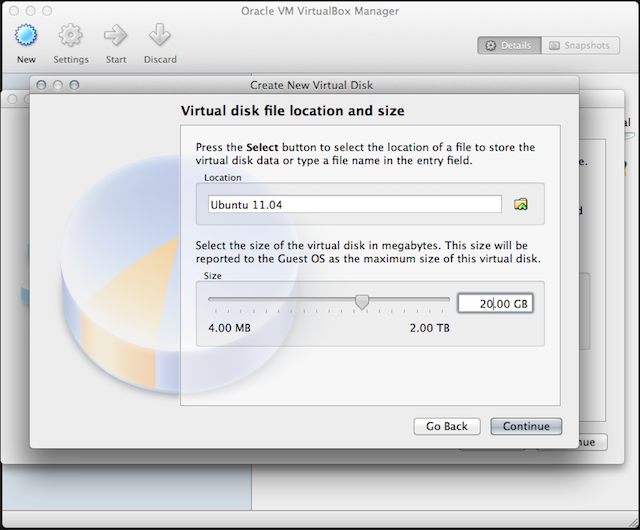
I chose dynamically allocated disk file and allocated 20GB of virtual disk space...


4. After creating your virtual machine, you are now all set to install Ubuntu 11.04 as guest OS on Mac OS X Lion host. Inside the 'VirtualBox Manager', click on the 'Start' icon to open the 'First Run Wizard'.


5. Once you are prompted to select an installation media, be sure to point the 'Media Source' to the Ubuntu 11.04 installer (ISO).


6. The Ubuntu Natty Narwhal LiveCD installer will now be running. Install Ubuntu like you normally would and wait for the installation to finish.


7. To be able to fully optimize the performance of your guest OS, you will need to install the VirtualBox Guest Additions. While running Ubuntu, go to 'Devices' menu of VirtualBox (found on the Mac OS X menu bar) and click on 'Install Guest Additions'.


8. You will also need to enable 3D acceleration in order to use Ubuntu with the Unity desktop. To do this, shut down Ubuntu, and then inside VirtualBox Manager, click on Settings -> Display and tick 'Enable 3D Acceleration'.


Here is a screenshot of my Mac OS X 10.7 'Lion' desktop running Ubuntu 11.04 'Natty Narwhal' using VirtualBox:


That's about it. If you have questions, feel free to ask via comment.

Humble Indie Bundle 3 for Linux is Here!

Posted: 31 Jul 2011 04:19 PM PDT

The immensely popular Humble Indie Bundle is back. In its third incarnation, the cross-platform games pack brings five amazing indie games without any DRM restrictions whatsoever. As with the previous bundles, you can pay any amount you want, be it $1 or $1000. The money you pay will go to charity and support the development of more indie games like these.

Humble Indie Bundle 3 comes loaded with five popular indie games, four of which will be available on Linux for the first time. The previous two bundles, which became insanely popular, have managed to raise around a million dollars, with most of the money going to charity.

Here's a quick overview of the games included in the bundle:


Crayon Physics Deluxe
This game is 2D physics puzzle/sandbox style game in which whatever you draw (using your crayons) will get transformed into real physical objects. The goal is to collect the star by creating objects around it. You can create rocks, circles, castles, houses, cars and everything your mind can imagine. The game has won the Seumas McNally Grand Prize at 2008 Independent Games Festival. Crayon Physics deluxe, which was available only for Windows until now can be enjoyed by Linux and Mac users thanks to the Humble Bundle. Bought separately, the game costs around 20 USD, but with the bundle, it's a steal.


Cogs
Another award-winning indie game to be included in this bundle is Cog, a steampunk puzzle game from Lazy8 Studios. Cog includes 50 unique levels wherein players build a variety of machines by sliding tiles. The game has won the grand prize for art direction and gameplay in Indie Game Challenge 2010 along with many other awards. Cog is available for a variety of platforms including iPhone, Mac, PC, and now for Linux as well. In the Steam store, this game costs around $10 (without the current discount), so grab the bundle as early as you can.


VVVVVV
This unusually titled game is a retro styled 2D platformer that has won the IndieCandie 2010 award for the most fun/compelling game. VVVVVV (that's the letter V six times) includes you, as the leader of a team of dimension-exploring scientists who inadvertently crash, and are separated. The fun begins when you start exploring the strange world in order to reunite with your friends. The uniqueness of this game is the fact that there are no gates, bossfights or powerups that you see in traditional games. Here, there are only challenges and more challenges. The movement in this game is unique too; being 2D, you might have expected this game to be a Mario-style side-scroller. On the contrary, VVVVVV doesn't allow you to jump. You can move forwards, backwards, but no jumping. Instead, you can instantly reverse the gravity and continue your quest. Cool huh? VVVVVV is priced at 5 USD in the Steam store. If you want to play a web-based demo of the game head over to this link.


Hammerfight
This is a Russian 2D physics-based game wherein you fight with flying machines that are equipped with various types of slashing, piercing and blunt weaponry. Hammerfight involves realistic physics simulation giving you the feel of real weaponry. You are in complete control of your rider's weapon; so, by simply waving the mouse you can smash your opponent to the wall. While doing so, you must rely on centripetal force to give your weapon enough kinetic energy to destroy enemies. The weapon, in turn, is connected to the player's hovering vehicle that makes it possible to swing the weapon in circles. Hammerfight has an engaging storyline with more than 50 weapons with which you could smash your foes. In the Steam store, this game has a community rating of 4.2/5 and is priced at 10 USD.


And Yet it Moves
This is single-player puzzle platform games developed by indie developer Broken Rules. The name comes from Galileo's remark "E pur si muove" which literally translates to "And yet it moves". The game involves you, controlling a paper collage-like world where in your main character has to survive. And Yet It Moves has a unique control set where instead of your character moving sideways or up and down, you rotate the entire world 90 or 180 degrees around him. The character however, retains his momentum relative to the frame of reference. So, if your character is about to get hit by a huge rock, you can simply move the frame in order to avoid him getting hit. AYIM, which is available for Windows, Mac, Linux and Wii, has received huge praise from the users and critics alike. It has a Metacritic rating of 82/100 with IGN giving it 8.4/10 stars.


In the payment page, you can choose how much of your money goes to developers and how much to charity. By default the payment is split into 4 parts: 55% to developers, 15% to EFF, 15% to Child's Play and another 15% as a tip to Humble Bundle Inc. You can move the slider to change the amount that goes to individual parties or instead, you can donate the entire amount to developers or to charity.