Search Site

Feed Section

Wednesday, December 19, 2012

TechSource: Best Free and Open Source Forum Software

TechSource: Best Free and Open Source Forum Software


Best Free and Open Source Forum Software

Posted: 18 Dec 2012 07:28 PM PST

If you run a website, or have build a software application, you'll need to have a certain amount of interaction with your users. One of the best ways to facilitate that is through forums. Forums not only allow seamless communication between users and developers, they also let companies provide support for their users. On the Internet, you'll find millions of forums dedicated to various issues. From teenage problems to geriatric care, forums bring people with similar tastes or issues together and let them communicate effortlessly.

One of the best things about forums is that they have been an indispensable part of the FOSS (Free and Open Source Software) culture. Be it the then-fledgling Ubuntu forums that helped desktop neophytes with installations and troubleshooting or the WOW forums that brought millions of gamers together, forums have been an integral part of the Internet since its inception.

For a FOSS lover though, everything should be open source and free as in freedom. So, forums too, for us, need to be in that open realm. If you are looking for the best free and open source forum software for your site, here is the big list:


phpBB

phpBB is one of the most popular open-source forum software out there. Written in PHP, this free tool supports multiple database engines and lets you extend it using various plugins and tools. phpBB has a huge community backing it and has been used widely by many software publishers and website owners. Currently in its third major version, the forum software comes with a modular design, high-security, and a multiple-language interface.

Feature-wise, very few software come close to phpBB. It comes with features like attachments, styles, data management, search system, notifications, and also caching.

On the security front, phpBB comes with various anti-spam features like CAPTCHA confirmation, flood warning, post approval and more. You can even mark a post or a private message as spam.


Vanilla Forums

Vanilla Forums is one of the coolest and the most stylish forum software around. It gives you nice-looking forums that are more community-based rather than being just tools for user support. You can customize your forums with various themes and also measure engagement by using statistics. Unlike phpBB wherein you get a plain-looking forum, Vanilla gives you a lot of control over the appearance, allowing you to make your forum site really look good. What's more, there's an official iPhone app for the software. Worth a try if you're looking for something cool and new to try out.


OSQA

OSQA is a free and open-source software forum that is more suited for FAQ-style forum. You can create a forum that is similar to AskUbuntu or StackOverflow with this software. OSQA gives its users points and badges based on their interactions and their contributions to the community.


bbPress

bbPress comes from the makers of WordPress. It is an open-source forum tool that is both easy to set up and simple to use. More than just creating a forum, with bbPress you can create an entire social network. If you've worked with Wordpress.org or .com before, you'll find bbPress very easy to use.


miniBB

miniBB is a free and lightweight forum tool for building your own forum. More often used by small-site owners and bloggers, it can serve as a great discussion board for a selected number of users. You can even test the forums at this page: http://minibb.org/minibb-test.php?

Though miniBB doesn't offer anything aesthetically pleasing, it is, nonetheless, one of the best forum tools if you're looking for something simple and lightweight.


FluxBB

If speed is your priority, then FluxBB might be the right one for you. Light, user-friendly, and of course, fast, FluxBB comes with a clean admin interface and easy installation and setup. Once installed, you can modify permissions very easily. Also, FluxBB supports both PHP4 and PHP5, allowing it to be installed on most of the web servers. Another notable feature of FluxBB is that it is very secure as compared to other forum software, making it a great choice for new users as well as experienced ones.


Monday, December 17, 2012

TechSource: Ubuntu for Android: Features and Expectations

TechSource: Ubuntu for Android: Features and Expectations


Ubuntu for Android: Features and Expectations

Posted: 16 Dec 2012 06:18 PM PST

Ubuntu for Android is one of the most eagerly awaited projects in the open-source community. Brainchild of Mark Shuttleworth and the Canonical team, Ubuntu for Android project has started getting a lot of attention lately. The main reason for this is that Canonical is attempting something unique by merging two of the most popular open-source platforms around. Hoping to provide a bridge between the desktop and mobile, Canonical is heavily banking on this project.

That said, there are many doubts and speculations whether this project will succeed or not. Ubuntu and Android are established brands; however, whether their marriage will be a triumph or a disaster remains to be seen. We know that you too are excited about this project as much as we are and hence we've come up with a list of features and expectations for the upcoming project.


Ubuntu for Android: What is it?

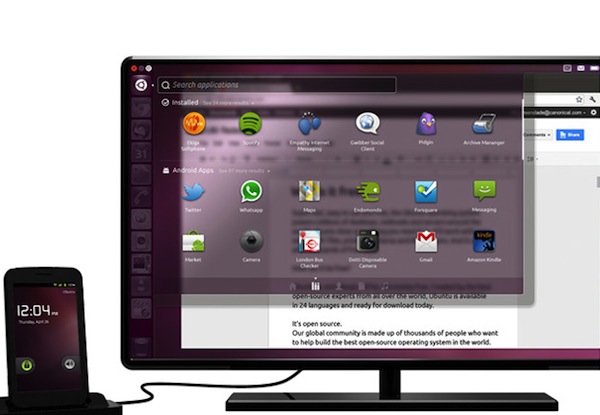
Ubuntu for Android is an Android application that would allow you to use your smartphone as a full-fledged computer. All you need is a dock, a monitor, and a keyboard-mouse set. Once you have that, any Ubuntu for Android-enabled phone can be used as a computer. All you have to do is connect your phone to the dock and the system boots up perfectly. Not only can you use the apps you have on your smartphone, you can also use the traditional Ubuntu desktop apps like Thunderbird, Firefox, and LibreOffice on the same desktop. So, you won't be surprised to find WhatsApp and Rhythmbox both existing in your launcher.

As your smartphone is connected to the dock, anything that happens on the phone can be viewed on the desktop. So, if you wish to receive important calls, messages, and more, you can do so even while the phone is locked.


Who is it for?

Ubuntu for Android is for everyone. Canonical is trying to broaden Ubuntu's reach by putting the open-source distro in the hands of every Android user. Any Androider with a dual-core smartphone can basically install the software and use it with the dock. Ubuntu fanboys will surely love it, but Android users who once were hesitant to switch to Linux operating system on the desktop might take the leap.


Will it work?

If Canonical implements it perfectly, and it works as it says on the tin, then there is a huge chance that this will work. The market is huge, and, being an innovative product, there is almost no competition. Of course, Apple or Microsoft might do something similar; however, if Canonical manages to penetrate the market first then it will have the upper hand in the game.

As for the doubts whether it will work or not. Only time will tell. Ubuntu for Android as seen in the ad might turn out to be quite different once it gets in the hands of the users. Canonical has to ensure that it gives its users top-notch quality software and hardware so that they'd gain trust in the Ubuntu brand.


Limitations

Well, Ubuntu for Android looks great in the adverts; however, one of the biggest limitations of the software is that it runs only on dual-core Android devices. Many users, especially on the Android platform, use a single-processor device. So, the market reach is limited to consumers using high-end Android handsets.

Secondly, you'll need a monitor, a keyboard, and a mouse to use it. Not that people don't have it, it's just that connecting the keyboard, mouse, and the monitor to the dock, then reconnecting it to the CPU seems to be quite a hassle. Also, many people use laptops these days, thus ruling them out of the list of potential consumers.


Should you buy it?

Ubuntu for Android isn't out yet; however, once it's out, many people might be a bit hesitant to buy it. I'd suggest that you wait for reviews before spending your hard-earned cash. Ubuntu for Android is an ambitious endeavor that can either fail terribly or can succeed like no other FOSS project. Let's keep our fingers crossed till it's released and hope that it's worth the wait.


Written by: Abhishek, a regular TechSource contributor and a long-time FOSS advocate.

Friday, December 14, 2012

TechSource: Why Google Plus is Good for Business

TechSource: Why Google Plus is Good for Business


Why Google Plus is Good for Business

Posted: 13 Dec 2012 06:09 PM PST

We've covered Google Plus a lot in our previous articles. The social extension to the world's most popular search engine has seen tremendous growth in just a year after its launch. As of now Google Plus has over a 100 million active users and the number keeps on growing day by day. Unlike Facebook wherein the whole world is a customer, Google Plus is just starting out. The social service is just spreading its wings and it's not doing that bad. Of course, nothing beats a giant like Facebook; however, Google Plus is a palpable threat to Zuckerberg.

Google Plus, though lagging behind Facebook, has quickly become the hot choice for many brands. With big celebrities and leaders like Barack Obama and Dalai Lama using Google Plus Hangouts to interact with their fans and followers, G+ is something that cannot be ignored. Many brands are making the most out of the amazing features that this fledgling social network offers. Furthermore, the clean, ad-free interface appeals to every FB hater.

So, if you're a small business owner, and are on the fence about creating a G+ page for your brand, think again. We've listed below, the smartest ways you can use Google Plus to promote your business.


Google Plus Pages

Google Plus Pages is much like Facebook Pages. If you own a business, a website, or even a little book club, you can use this neat little feature to gain more exposure. You get a page for your business wherein you can post latest updates about your products and even interact with your customers and fans. Encourage your fans to write or talk about your products by posting shareable links on your G+ feed. This will help spread the word about your business. Additionally, you can share videos, photos, and other details about your business that will help new clients get to know your brand better.

As with any Google Plus account, you can add your customers, friends, and family in your Circles, and they, in turn, can add you back. Once you are in their circles, your updates will show up in their home feed.

The other advantage, which is not available to everyone yet, is that you can create vanity URLs for your brand. URLs like plus.google.com/+toyota or https://plus.google.com/+hughjackman help give your business a page that everyone can remember and can visit anytime.

 You may visit our Google Plus Page HERE.


Google Plus Events

If you are hosting a party or are revitalizing your business, Google Plus Events is a great feature. Functioning pretty much like Facebook Events, this feature lets you plan out almost anything whether your clients are or not in your circles. Compared to Facebook Events, its Google counterpart has one big advantage that it can sync with the trusted Google Calendar. This makes it easy for Android users as well as other Google Calendar users to look up and get reminded of those events easily. What's more, if your business has just started, you can even create an event for the launch and try and invite as many people as you can. 


Google Plus Hangouts

Google Plus Hangouts is one of the coolest features in Google Plus. This one lets you video chat with up to 10 people at once making it easier for you to connect with your clients. You can even host a business meeting with your employees using this feature. 


Google Plus Local

Google Plus Local is probably the most important feature for businesses. Once your business is on Google Plus Local listings, users will be allowed to review it. They will 'check in' to your business, write anything about it, and even post pictures of it. 


So, if your venture is good enough, make sure that you remind people who visit your shop, to check-in via Google Plus. Maybe a small banner, or a QR code will push customers to do that. Google Plus Local, if used to the fullest, can be very beneficial for your business, especially for gaining more local exposure.

Thursday, December 13, 2012

[HowtoForge] Newsletter 12/13/2012

HowtoForge Newsletter 12/13/2012
================================

*** Version 1.3 of the ISPConfig 3 Manual ***
=============================================

The next update of the ISPConfig 3 Manual is available in PDF format (version 1.3 for ISPConfig >= 3.0.4; Date: 10/25/2011).

Version 1.3 for ISPConfig >= 3.0.4 (Date: 10/25/2011)
Author: Falko Timme
333 pages

The manual can be downloaded from these two links:

http://www.ispconfig.org/ispconfig-3/ispconfig-3-manual/
http://www.howtoforge.com/download-the-ispconfig-3-manual


*********************************************
*********************************************


ISPConfig Monitor App for Android Phones
========================================

With the ISPConfig Monitor App, you can check your server status and find out if all services are running as expected. You can check TCP and UDP ports and ping your servers. In addition to that you can use this app to request details from servers that have ISPConfig installed; these details include everything you know from the Monitor module in the ISPConfig Control Panel (e.g. services, mail and system logs, mail queue, CPU and memory info, disk usage, quota, OS details, RKHunter log, etc.).

Download/Usage
==============

For download and usage instructions, please visit http://www.ispconfig.org/ispconfig-3/ispconfig-monitor-app-for-android/ .


*********************************************
********************************************


*** HowtoForge Now Has Its own Facebook Page ***
================================================

We at HowtoForge are proud to announce that our new Facebook page is now available under http://www.facebook.com/howtoforge. As most of you probably have a Facebook account, we want to use this additional channel to post updates and get feedback from you. Therefore we would like you to "Like" our page, share it with your friends, post comments, etc.

http://www.facebook.com/howtoforge
********************************************************************


New HOWTOs:
===========

* Installing KVM Guests With virt-install On Ubuntu 12.10 Server
* How To Install XFCE On Linux Mint 14
* Encrypt Your Data With EncFS (Fedora 17)
* Encrypt Your Data With EncFS (OpenSUSE 12.2)
* Setting Up An NFS Server And Client On CentOS 6.3
* Installing SugarCRM Community Edition On Fedora 17

++++++++++++++++++++++++++++++++++++++++++++++++++++++++++++

Installing KVM Guests With virt-install On Ubuntu 12.10 Server
==============================================================

Unlike virt-manager, virt-install is a command line tool that allows you to create KVM guests on a headless server. You may ask yourself: "But I can use vmbuilder to do this, why do I need virt-install?" The difference between virt-install and vmbuilder is that vmbuilder is for creating Ubuntu-based guests, whereas virt-install lets you install all kinds of operating systems (e.g. Linux, Windows, Solaris, FreeBSD, OpenBSD) and distributions in a guest, just like virt-manager. This article shows how you can use it on an Ubuntu 12.10 KVM server.

You can find the document here:
-------------------------------
http://www.howtoforge.com/installing-kvm-guests-with-virt-install-on-ubuntu-12.10-server


How To Install XFCE On Linux Mint 14
====================================

XFCE is a lightweight desktop environment. For Linux Mint 13, the was an XFCE edition in addition to the Cinnamon and Mate editions, but for Linux Mint 14, there isn't. This short guide explains how to install XFCE on your Linux Mint 14 desktop.

You can find the document here:
-------------------------------
http://www.howtoforge.com/how-to-install-xfce-on-linux-mint-14


Encrypt Your Data With EncFS (Fedora 17)
========================================

EncFS provides an encrypted filesystem in user-space. It runs without any special permissions and uses the FUSE library and Linux kernel module to provide the filesystem interface. It is a pass-through filesystem, not an encrypted block device, which means it is created on top of an existing filesystem. This tutorial shows how you can use EncFS on Fedora 17 to encrypt your data.

You can find the document here:
-------------------------------
http://www.howtoforge.com/encrypt-your-data-with-encfs-fedora-17


Encrypt Your Data With EncFS (OpenSUSE 12.2)
============================================

EncFS provides an encrypted filesystem in user-space. It runs without any special permissions and uses the FUSE library and Linux kernel module to provide the filesystem interface. It is a pass-through filesystem, not an encrypted block device, which means it is created on top of an existing filesystem. This tutorial shows how you can use EncFS on OpenSUSE 12.2 to encrypt your data.

You can find the document here:
-------------------------------
http://www.howtoforge.com/encrypt-your-data-with-encfs-opensuse-12.2


Setting Up An NFS Server And Client On CentOS 6.3
=================================================

This guide explains how to set up an NFS server and an NFS client on CentOS 6.3. NFS stands for Network File System; through NFS, a client can access (read, write) a remote share on an NFS server as if it was on the local hard disk.

You can find the document here:
-------------------------------
http://www.howtoforge.com/setting-up-an-nfs-server-and-client-on-centos-6.3


Installing SugarCRM Community Edition On Fedora 17
==================================================

SugarCRM is a webbased CRM solution written in PHP. SugarCRM is available in different flavours called "Editions" ("Community" (free), "Professional", and "Enterprise"). For a detailed overview of the different editions, have a look at the SugarCRM website. In this tutorial I will describe the installation of the free Community Edition on Fedora 17. With the modules My Portal, Calendar, Activities, Contacts, Accounts, Leads, Opportunities, Cases, Bugtracker, Documents and Email, SugarCRM Community Edition offers everything that can be expected from a CRM solution.

You can find the document here:
-------------------------------
http://www.howtoforge.com/installing-sugarcrm-community-edition-on-fedora-17


++++++++++++++++++++++++++++++++++++++++++++++++++++++++++++++
++++++++++++++++++++++++++++++++++++++++++++++++++++++++++++++

You can now support HowtoForge by becoming a subscriber:

HowtoForge Subscription
=======================

*** New! We now accept RBS WorldPay payments in addition to PayPal. ***

For a monthly fee of 5 EUR or 25 EUR for half a year, you can become a HowtoForge supporter and help us cover our costs (servers, bandwidth, etc.) and support ISPConfig development. In return, you receive the following benefits:

1. Download the ISPConfig 3 Manual (from http://www.howtoforge.com/download-the-ispconfig-3-manual).
2. Access the whole HowtoForge web site without any ads.
3. Download the results of our tutorials as VMware images (where available) (a list of downloadable VMware images is available here: http://www.howtoforge.com/list-of-downloadable-vmware-images).
4. Download our tutorials as PDF files.
5. View our tutorials as printer-friendly pages.
6. You will be marked as a "HowtoForge Supporter" in your forum posts.
7. Plus, you support the ISPConfig development.

If you have the free VMware Server or Player installed, you can import our VMware images and start playing around with the results of our tutorials immediately. It's a great way to track down problems with your own setup or simply to save time. ;-)

More details can be found on http://www.howtoforge.com/subscription.

++++++++++++++++++++++++++++++++++++++++++++++++++++++++++++++
++++++++++++++++++++++++++++++++++++++++++++++++++++++++++++++

Best Regards,

Your HowtoForge Team
Email: info@howtoforge.com
URL: http://www.howtoforge.com

To unsubscribe or update your records, click here: http://newsletter.howtoforge.com/howtoforge/user/update.php?email=matrixunix.ubuntu@blogger.com&code=d8531959c7da2982ec3a7f8f82a13961

Wednesday, December 12, 2012

TechSource: Best Christmas-themed Apps for Android

TechSource: Best Christmas-themed Apps for Android


Best Christmas-themed Apps for Android

Posted: 12 Dec 2012 04:30 AM PST

It is December once again and everyone's busy decorating the good old Christmas tree. The snow is falling and the streets are lit up like a million stars. Oh how I love the Christmas season! It's everybody's favorite time of the year. Giving gifts, getting together with family, greeting your loved ones, and impatiently awaiting gifts from Santa Claus.

While nothing recreates the exact feel of the revered festival, there are a few Android apps would will help you bring the look and feel of Christmas right on your smartphone. These apps bring a lot of Christmasy variety to your smartphone by decorating it with nicely themed countdown timers, live wallpapers, launcher themes and more. So, if you're as excited about Christmas as I am, then here are some of the best Christmas-themed apps for your Android device.


GO Launcher EX Theme Christmas

If you are using GO Launcher and are excited about Christmas, then this app is just for you. Once installed, your phone gets that red and white Christmasy feel that we all love. Of course, you'll need to install GO Launcher first for it to work for you.


Talking Santa Free

From the makers of Talking Tomcat comes this unique app that lets you talk to Santa Claus for free. You can talk to him, ask him for some gifts and even tickle or poke him if that is what you want to do. And if he refuses to bring you any gifts, you can simply slap him or hurl a huge snowball at him. I guess I will have to throw many snowballs if he doesn't send a brand new Google Nexus 4 my way. Hmmmph!


Christmas Countdown 2012 Free

While the Elves are busy with the Christmas preparations, the lazy Frost Giant is found oversleeping. He was the one who was supposed to bring the snow for Christmas. Now, a delegation of Elves has been sent to the Giant's cave to wake him up and ensure that he completes the task. This app continues the story of the Elves and the Frost Giant revealing each chapter of the story, one day at a time. This also serves as a fun Christmas countdown in the form of a wonderful story.


Christmas Tree Live Wallpaper


This free live wallpaper lets you put a beautiful Christmas tree right on your Android home screen. You can choose how the tree looks, whether it is happy, normal or frozen. Furthermore, the app lets you configure various settings like lights, sparkling, sound, time of the day, and snow speed.


3D Christmas Live Wallpaper

This is another great live wallpaper that also serves as a Christmas countdown timer. With an interactive image of sparkling fireworks in the shape of a Christmas tree, this free app makes your smartphone look gorgeous. The live wallpaper can be configured to your liking. Moreover you can also use it after Christmas as it works for Valentine's Day and many other occasions.


Christmas HD

Christmas HD is another great live wallpaper application for Android. Meticulously detailed and that too in true 3D, this app brings a realistic Christmas experience to your home screen. Like most of the good live wallpapers out there, this one too can be customized to your liking.


Christmas Ringtones

This free application brings the best Christmas ringtones and soundboard to your Android device. From The First Noel to Joy To The World, this free app lets you use any tune as your ringtone just by simply clicking a button.


Bunny Shooter Christmas

Bunny Shooter is an amazing puzzle game for Android. The premise of it is that you shoot evil fluffy pink bunnies with your bows. Though the game resembles Angry Birds a lot, it's still worth your time. Just in the right time, the developers have come up with a Christmas-themed version of the application making it even more fun to play.