TechSource: 6 Siri-Like Apps For Android |
| You are subscribed to email updates from TechSource To stop receiving these emails, you may unsubscribe now. | Email delivery powered by Google |
| Google Inc., 20 West Kinzie, Chicago IL USA 60610 | |
Resources, help, HowTo and tutorials for Ubuntu Users
TechSource: 6 Siri-Like Apps For Android |
| You are subscribed to email updates from TechSource To stop receiving these emails, you may unsubscribe now. | Email delivery powered by Google |
| Google Inc., 20 West Kinzie, Chicago IL USA 60610 | |
TechSource: Most Highly Recommended Books About Linux |
| Most Highly Recommended Books About Linux Posted: 16 Dec 2011 06:15 PM PST Ever since we started this blog, we've talked about Linux at great length. We've provided tips, tutorials, hacks and even some spicy gossip from the magical Penguinland. While that may suffice your geek cravings, the information falls quite short if you're trying to learn about Linux in greater detail. For learning Linux, you'll need a deeper knowledge and understanding about the system and its functions. And what better way to learn Linux than by filling your shelf with some great books on the topic?In this article, we'll be listing some of the best books about the operating system. Not only are they helpful for Linux geeks and hackers, they're also a great starting point for anyone who's always wanted to learn Linux. So, if you're a desktop neophyte or a coding ninja, here are some of the most highly recommended books about Linux: Linux Pocket Guide If you want to take a no-fluff, only-the-good-bits approach towards learning Linux, then the Linux Pocket guide is the best place to start. Though not a comprehensive reference book, the little book does pack in a lot of material that you can reference any time you want. An essential book to own for Linux administrators, and for students who are studying for Linux-based certifications. Unix and Linux System Administration Handbook Currently in its fourth edition, this 1200-paged book covers everything you want to know about Linux and UNIX system administration. The book is divided into three parts, Basic Administration, Networking and Bunch o' Stuff. Basic Administration will give you a broad overview of UNIX and Linux from a system administrator's point of view. By the end of the section, you'll be able to administer your own computer. Networking deals with all the protocols used on UNIX and Linux that help set up, extend and maintain networks and Internet-facing servers. The final section includes a lot of supplemental information like virtualization, Eco-friendly computing and more. To make sure you understand all the stuff perfectly, every chapter ends with a set of practice exercises. Simply put, the book is a must-have for anyone who wants to get into system administration. Linux in a Nutshell While the aforesaid Linux Pocket Guide serves as a great reference tool, this next book helps you dig deeper into the operating system. Linux in a Nutshell is a book that covers almost everything about Linux. Written by four experienced authors from the Linux community, the 1000-paged tome includes a variety of topics that both novices and experts will find useful. Currently in its sixth edition, Linux in a Nutshell has been rated 4 and ½ out of 5 stars by Amazon users. The Linux Programming Interface: A Linux and UNIX System Programming Handbook This book is a definitive guide to the Linux and UNIX programming interfaces. Written by Micheal Kerrisk, Linux Programming Interfaces gives a detailed insight into all the system calls and library functions that are needed to master the craft of system programming. The book is filled with examples, exercises, diagrams and detailed descriptions that will help you master the topic without any need for external help. Overall, an essential book for anyone who wants to get started on system programming. A Practical Guide to Linux Commands, Editors, and Shell Programming The title of the book says it all. Written by Mark. G. Sobbell, the book explains how to work with the Linux operating system from the command line. Not only that, there are also detailed coverage of Mac OS's command line interface, which is an added bonus. Linux All-in-One for Dummies Unlike most of the aforementioned books, which dealt with more advanced topics, this book sticks to the basics and helps you take your first steps into the penguinland. Covering a vast array of basic topics, the book is divided into nine self-contained minibooks that makes the content much more organized and easy to scan through. Topics include system administration, security, programming, scripting, and of course, the very basics of Linux. Worth your every hard-earned penny if you're trying to use and understand Linux. Working at the Ubuntu Command-Line Prompt Written by award-winning author Kier Thomas, this Kindle-only book will make you a Ubuntu command-line ninja in no time. The book will teach you basic shell commands, syntax and some advanced techniques in a simple, easy-to-understand manner. Overall, the book proves to be a great way to get started with the command prompt. Linux Command Line and Shell Scripting Bible Cited as the authoritative guide to the Linux command line, this book is the only book you'll need if you want to master shell scripting. Filled with real-world examples, the book isn't just for Linux pros; it's a book that even novices can pick up and enjoy reading. Written by experienced authors, Linux Command Line and Shell Scripting Bible is a must-have book for anyone who's serious about taking up shell scripting. Beginning Ubuntu Linux Written by Kier Thomas, Andy Channelle, and Jamie Sicam, Beginning Ubuntu Linux is a great starting point for anyone who is curious about Ubuntu and its working. Being the number 1 distribution around, Ubuntu's importance cannot be overlooked. This book will take you from the very basics of Ubuntu to more advanced topics like shell scripting, user management and SSH networking. Overall, a great choice if you want to master the popular operating system. How Linux Works: What Every Superuser Should Know Written by Brian Ward, How Linux Works gives you a deeper insight into the internals of the Linux system. Aimed at system administrators, this book teaches you how to deal with real-world issues that arise while administrating a Linux system. With coverage of vast array of topics -- from boot sequence to networking – How Linux Works is a great investment if you're a system administrator. Written by: Abhishek, a regular TechSource contributor and a long-time FOSS advocate. |
| You are subscribed to email updates from TechSource To stop receiving these emails, you may unsubscribe now. | Email delivery powered by Google |
| Google Inc., 20 West Kinzie, Chicago IL USA 60610 | |
TechSource: ASUS Transformer Prime vs. Motorola XOOM 2 |
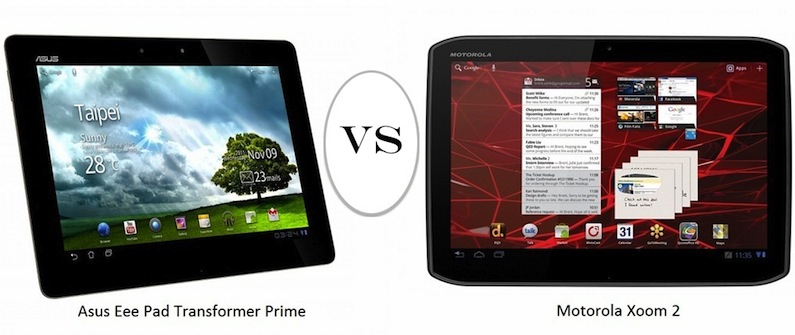
| ASUS Transformer Prime vs. Motorola XOOM 2 Posted: 14 Dec 2011 10:36 PM PST Android tablet computers haven't quite gained the same amount of popularity that the Apple iPad did. That said, it doesn't mean that there aren't any quality Android tablets around. In fact, this November, two big companies, ASUS and Motorola, launched their own tablets that are powerful enough to give the iPad a run for its money. ASUS's Transformer Prime and Motorola's XOOM 2 are battling it out to become the top Android tablet of 2011. While the battle may be an exciting thing to watch, when it comes to buying a top-notch tablet, there's often a dilemma about which one to choose. So, if you're an Android lover and are planning to buy any of the two tablets (or both), read on as we compare them head to head. Motorola XOOM, which was the first tablet to feature the somewhat contentious Honeycomb UI, has a new successor. Simply called XOOM 2, the 10.1 Android-based device promises to be 33 percent thinner and 10 percent lighter than its predecessor. Loaded with Honeycomb 3.2, XOOM 2 comes with some impressive specs, and even though the steep pricing leaves a lot to be desired, it's still one of the most coveted tablet computers around. Despite some amazing features, the XOOM 2 does pale out when pitted against the much-hyped ASUS Transformer Prime. Currently selling in the UK, the Transformer boasts of even more features at a much lower price. Also running Honeycomb 3.2, the tablet-cum-laptop device comes with a 1.3 GHz Quad-core Nvidia Tegra 3 processor. Showing off the device performance is a 10.1-inch Gorilla Glass display with a 1280x800 resolution. ![]() Operating System Though specs are top of the line, the only thing common between both the devices is that they're running Honeycomb 3.2. Don't worry if you hate the OS, as both devices will soon be getting upgraded to Android 4.0 Ice Cream Sandwich, which runs on the Samsung / Google Galaxy Nexus. The Specs The Motorola XOOM 2 is backed by a 1.2 GHz OMAP4 processor whereas the Asus Transformer Prime sports a 1.3 GHz Quad-core Tegra 3 processor. In terms of storage capacity, the Prime comes in 2 versions: 32 GB and 64 GB. The XOOM2 on the other hand, only offers 16 GB of internal storage. The RAM on both the devices is 1GB and both come with a micro-HDMI port. As usual, there's Wi-Fi, Bluetooth, and a 3.5 mm headphone jack on both devices. Undoubtedly, the Prime completely outmatches the XOOM 2 when it comes to the specs. Unique Features Though the XOOM 2 is not nearly as impressive as the Prime, there are some areas where it stands out. The Motorola-made tablet, apart from being a full-fledged reading and work device, does serve as a good multimedia gadget. With a 3D virtual surround sound and a nice display, the XOOM 2 makes a good device for watching movies. Moreover, the Motorola XOOM 2 is also available as a Media Edition. The Media Edition comes with an additional feature that streams files from the PC to the device. Also in the special edition is an 8.2-inch HD display with Adaptive Surround Sound technology. Though there's not much to boast of, the Xoom 2 Media Edition does manage to make some iPad users a tad jealous. Heading off to the ASUS Transformer Prime, the biggest selling point of this device is its ability to transform itself into a full-fledged laptop. The keyboard dock, which is bundled separately, allows the tablet to be used as a laptop while extending its battery life. Of course, the dock adds to the price, but still, the Transformer Prime is a great investment for any tablet fan. Price Though not yet confirmed, the ASUS Transformer Prime will be priced at around $500, while the Motorola XOOM 2 will probably set you back by $618. The keyboard dock for the Transformer Prime will be priced at $150. So, what gives the Asus Transformer Prime the edge over the Motorola XOOM 2? Well, pretty much everything. The battery life, the lower price point, the Tegra 3 processor, and the shiny aluminum design at the back make the Asus Transformer Prime one of the best tablets around. In fact, popular gadget site Engadget has even deemed it as the best Android tablet computer around. Oh, and don't forget, it's a laptop too! You may also like: Holiday Gift Ideas for Linux and Android Fans |
| You are subscribed to email updates from TechSource To stop receiving these emails, you may unsubscribe now. | Email delivery powered by Google |
| Google Inc., 20 West Kinzie, Chicago IL USA 60610 | |
HowtoForge Newsletter 12/15/2011
================================
*** Version 1.3 of the ISPConfig 3 Manual ***
=============================================
The next update of the ISPConfig 3 Manual is available in PDF format (version 1.3 for ISPConfig >= 3.0.4; Date: 10/25/2011).
Version 1.3 for ISPConfig >= 3.0.4 (Date: 10/25/2011)
Author: Falko Timme
333 pages
The manual can be downloaded from these two links:
http://www.ispconfig.org/ispconfig-3/ispconfig-3-manual/
http://www.howtoforge.com/download-the-ispconfig-3-manual
*********************************************
*********************************************
ISPConfig Monitor App for Android Phones
========================================
With the ISPConfig Monitor App, you can check your server status and find out if all services are running as expected. You can check TCP and UDP ports and ping your servers. In addition to that you can use this app to request details from servers that have ISPConfig installed; these details include everything you know from the Monitor module in the ISPConfig Control Panel (e.g. services, mail and system logs, mail queue, CPU and memory info, disk usage, quota, OS details, RKHunter log, etc.).
Download/Usage
==============
For download and usage instructions, please visit http://www.ispconfig.org/ispconfig-3/ispconfig-monitor-app-for-android/ .
*********************************************
********************************************
*** HowtoForge Now Has Its own Facebook Page ***
================================================
We at HowtoForge are proud to announce that our new Facebook page is now available under http://www.facebook.com/howtoforge. As most of you probably have a Facebook account, we want to use this additional channel to post updates and get feedback from you. Therefore we would like you to "Like" our page, share it with your friends, post comments, etc. :-)
http://www.facebook.com/howtoforge
********************************************************************
New HOWTOs:
===========
* The Perfect Desktop - Pinguy OS 11.10 (Beta)
* How To Encrypt Mails With SSL Certificates (S/MIME)
* Running Joomla 1.7 On Nginx (LEMP) On Debian Squeeze/Ubuntu 11.10
* Installing Lighttpd With PHP5 And MySQL Support On CentOS 6.0
* vsftpd: Local And Virtual Users With Bash Scripts For User Maintainance (CentOS 6.0)
* PDNSD HowTo - A DNS Caching Personal Server (Fedora 16)
++++++++++++++++++++++++++++++++++++++++++++++++++++++++++++
The Perfect Desktop - Pinguy OS 11.10 (Beta)
============================================
This tutorial shows how you can set up a Pinguy OS desktop that is a full-fledged replacement for a Windows desktop, i.e. that has all the software that people need to do the things they do on their Windows desktops. The advantages are clear: you get a secure system without DRM restrictions that works even on old hardware, and the best thing is: all software comes free of charge. The Pinguy OS developer has stated that there propably will not be any further release of Pinguy 11.10 due to some instabilities of the components used. This Perfect Desktop tutorial therefore refers to the currently released beta version of Pinguy OS 11.10.
You can find the document here:
-------------------------------
http://www.howtoforge.com/the-perfect-desktop-pinguy-os-11.10-beta
How To Encrypt Mails With SSL Certificates (S/MIME)
===================================================
This article is about how to use the S/MIME encryption function of common e-mail clients to sign and/or encrypt your mails safely. S/MIME uses SSL certificates which you can either create yourself or let a trusted certificate authority (CA) create one for you.
You can find the document here:
-------------------------------
http://www.howtoforge.com/how-to-encrypt-mails-with-ssl-certificates-s-mime
Running Joomla 1.7 On Nginx (LEMP) On Debian Squeeze/Ubuntu 11.10
=================================================================
This tutorial shows how you can install and run a Joomla 1.7 web site on a Debian Squeeze or Ubuntu 11.10 system that has nginx installed instead of Apache (LEMP = Linux + nginx (pronounced "engine x") + MySQL + PHP). nginx is a HTTP server that uses much less resources than Apache and delivers pages a lot of faster, especially static files.
You can find the document here:
-------------------------------
http://www.howtoforge.com/running-joomla-1.7-on-nginx-lemp-on-debian-squeeze-ubuntu-11.10
Installing Lighttpd With PHP5 And MySQL Support On CentOS 6.0
=============================================================
Lighttpd is a secure, fast, standards-compliant web server designed for speed-critical environments. This tutorial shows how you can install Lighttpd on a CentOS 6.0 server with PHP5 support (through FastCGI) and MySQL support.
You can find the document here:
-------------------------------
http://www.howtoforge.com/installing-lighttpd-with-php5-and-mysql-support-on-centos-6.0
vsftpd: Local And Virtual Users With Bash Scripts For User Maintainance (CentOS 6.0)
====================================================================================
vsftpd is the most popular FTP server in the Linux world and is secure and fast. Recently I had to configure a FTP server quickly onto a CentOS server setup built using the minimal ISO and the server was up and running in a snap.
You can find the document here:
-------------------------------
http://www.howtoforge.com/vsftpd-local-and-virtual-users-with-bash-scripts-for-user-maintenance-centos-6.0
PDNSD HowTo - A DNS Caching Personal Server (Fedora 16)
=======================================================
PDNSD is a non authoritative caching DNS server. It maintains a disk cache of the queries that your system performs and subsequent queries will be faster from the cache. It is safe enough to be used on a personal Unix/Linux system as a home Desktop or a Laptop.
You can find the document here:
-------------------------------
http://www.howtoforge.com/pdnsd-howto-a-dns-caching-personal-server-fedora-16
++++++++++++++++++++++++++++++++++++++++++++++++++++++++++++++
++++++++++++++++++++++++++++++++++++++++++++++++++++++++++++++
You can now support HowtoForge by becoming a subscriber:
HowtoForge Subscription
=======================
*** New! We now accept RBS WorldPay payments in addition to PayPal. ***
For a monthly fee of 5 EUR or 25 EUR for half a year, you can become a HowtoForge supporter and help us cover our costs (servers, bandwidth, etc.) and support ISPConfig development. In return, you receive the following benefits:
1. Download the ISPConfig 3 Manual (from http://www.howtoforge.com/download-the-ispconfig-3-manual).
2. Access the whole HowtoForge web site without any ads.
3. Download the results of our tutorials as VMware images (where available) (a list of downloadable VMware images is available here: http://www.howtoforge.com/list-of-downloadable-vmware-images).
4. Download our tutorials as PDF files.
5. View our tutorials as printer-friendly pages.
6. You will be marked as a "HowtoForge Supporter" in your forum posts.
7. Plus, you support the ISPConfig development.
If you have the free VMware Server or Player installed, you can import our VMware images and start playing around with the results of our tutorials immediately. It's a great way to track down problems with your own setup or simply to save time. ;-)
More details can be found on http://www.howtoforge.com/subscription.
++++++++++++++++++++++++++++++++++++++++++++++++++++++++++++++
++++++++++++++++++++++++++++++++++++++++++++++++++++++++++++++
Best Regards,
Your HowtoForge Team
Email: info@howtoforge.com
URL: http://www.howtoforge.com
To unsubscribe or update your records, click here: http://newsletter.howtoforge.com/howtoforge/user/update.php?email=matrixunix.ubuntu@blogger.com&code=d8531959c7da2982ec3a7f8f82a13961
TechSource: Best IM / Chat Clients For Android |
| Best IM / Chat Clients For Android Posted: 12 Dec 2011 10:05 PM PST Instant messaging technology has been around since the 1960s. However, it was not until late 1990s that chat / IM desktop clients like AOL Messenger came out and totally revolutionized the way we communicate across borders. What's more surprising is that the long-established technology has stood the test of time and has constantly been evolving decade after decade. In the recent years, the Instant Messaging scene has gone through another such transition by making its foray into the mobile space.Numerous IM clients for iPhone, Nokia and Blackberry are already out there for download, many of which are completely free. On Android too, there's a surplus of such apps; however it does get rather hard for users to pick out the best once. So, if you're looking for a good IM client on Android, don't worry, we've done all the hard work for you and compiled a list of some of the best IM clients out there. Without further ado, here's the list of the best IM/chat clients for Android: Nimbuzz Nimbuzz is a popular all-in-one communications client for mobile phones. Apart from letting users call and message each other without any charge, this free application also comes with a fully featured IM client with built-in support for Yahoo Messenger, MSN Messenger (Windows Live Messenger), Google Talk, Myspace and Hyves. Being one of the very few clients that support HD calling, Nimbuzz does outshine the rest when it comes to features and stability. With over 60 million registered users, Nimbuzz is freely available for download from the marketplace. eBuddy eBuddy is another well-known chat client that comes with support for a huge number of IM services. The free application has built-in support for Yahoo Messenger, MSN, AIM, GTalk, ICQ, Facebook, and Hyves. Since the app runs in background, you can receive messages from your chat buddies even while you're not using the phone. If you're just looking for a feature-laden all-in-one IM client then eBuddy should be your pick. Yahoo Messenger This next app delivers the once-trendy IM experience on your Android device. With beta support for voice calls and video calls, Yahoo Messenger for Android includes an interface that's quite similar to what you'll find on its desktop or web version. You can share photos, videos, and also connect with your buddies on Windows Live Messenger and Facebook. Rated 3.9 stars and with over 5 million downloads so far, Yahoo Messenger is a great choice for those who've been loyal users of the service. Facebook Messenger Specially designed for Facebook junkies, this next app lets you stay connected with your FB 'friends' on the go. Since Faceboook Messenger works across all major mobile platforms, you won't have to badger your friends to switch to Android just for this app. Moreover, if any of your friends doesn't have the app just yet, it also lets you bug them by sending text messages. If you're an avid FB user, I bet you've already skipped this section. Messenger with You Though not developed by the Android-loving Microsoft, Messenger With You (MWY) is the closest you'll get to using MSN messenger on your Droid. With support for MSN and Yahoo Messenger, MWY comes with an impressive list of features that have made it quite popular in the marketplace. Moreover, the free app also includes support for group chat as well as file transfer. Imo Instant Messenger Despite there's being an overload of all-in-one IM client apps in the market place, IMO stands out from the crowd with its simple, no-fuss approach to instant messaging. First of all, unlike the aforementioned Nimbuzz or eBuddy, you don't need to create a separate IMO account. Just plug in your IM service's credentials and you're good to go. Secondly, IMO supports a vast number of services which include Facebook, Skype, Yahoo Messenger, Windows Live Messenger, Google Talk, AIM, Hyves and a few others, making it a one-stop solution to all your IM needs. There are also other great features like Voice IMs, concurrent sessions, photo sharing, etc., which are quite unique. Rated 4.3 out of 5 stars, Imo Instant Messenger is freely available for download from the marketplace. Written by: Abhishek, a regular TechSource contributor and a long-time FOSS advocate. |
| You are subscribed to email updates from TechSource To stop receiving these emails, you may unsubscribe now. | Email delivery powered by Google |
| Google Inc., 20 West Kinzie, Chicago IL USA 60610 | |